A Beginner’s Guide
Virtual Reality, or VR, is a cutting-edge technology that takes gaming to an entirely new dimension. Imagine stepping into the game itself, where you’re not just controlling a character but becoming part of the action. VR gaming blurs the lines between the real world and the digital universe, creating a fully immersive experience that captivates your senses.

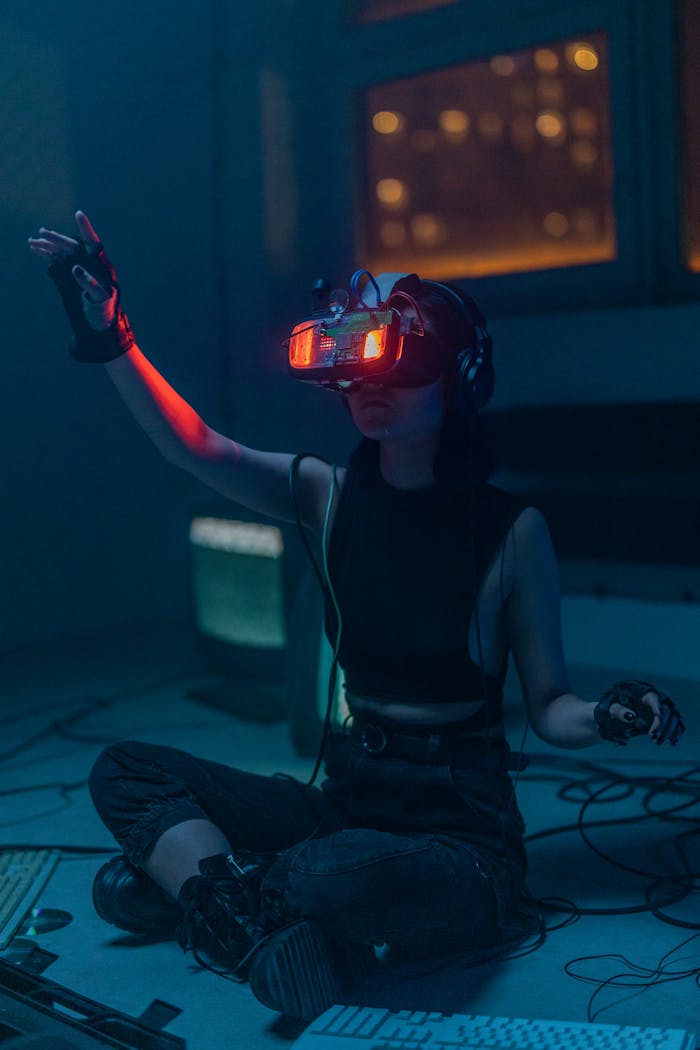
So, what exactly is VR? In the simplest terms, VR uses advanced technology to create a simulated environment that you can interact with as if you were actually there. By wearing a VR headset, you’re transported into a 3D world where your movements are tracked, and your surroundings respond in real-time. Some systems even include handheld controllers or gloves, allowing you to manipulate objects and perform actions within the virtual space.
For novice gamers, VR might seem intimidating at first, but it’s surprisingly beginner-friendly. Many VR games are designed to be intuitive, encouraging natural movements like looking around, walking, or reaching out—something that even non-gamers can quickly pick up. You don’t need years of gaming experience to enjoy VR; all you need is curiosity and a willingness to dive into the unknown.
One of the most exciting aspects of VR gaming is the sheer variety of experiences it offers. Love adventure games? You can explore ancient ruins, climb mountains, or even fight dragons in stunningly realistic environments. Prefer something more relaxing? VR lets you take a virtual walk on a sunny beach, meditate in a peaceful forest, or paint in 3D with apps like Tilt Brush. For thrill-seekers, there are pulse-pounding options like horror games or fast-paced shooters that put you in the heart of the action.
But it’s not all about the games. VR also opens the door to social interaction and collaboration. Many VR platforms include multiplayer options, allowing you to connect with friends or meet new people in shared virtual spaces. It’s like hanging out in another world, where your avatars interact in ways that mimic real-life socializing.
For those who worry about motion sickness or the learning curve, fear not! VR developers are continuously improving technology to make the experience smoother and more comfortable. Plus, beginner-friendly games and tutorials are readily available, ensuring that your first foray into VR is both enjoyable and accessible.
As a novice gamer, VR offers an incredible opportunity to explore gaming in a way that’s immersive, interactive, and downright magical. It’s not just about playing a game—it’s about stepping into an entirely new world and experiencing it firsthand. So, whether you’re a tech enthusiast or someone looking for a new hobby, VR gaming is a fantastic place to start your journey.
Ready to don that VR headset and embark on your first adventure? The possibilities are endless, and the experience is sure to leave you in awe. Welcome to the future of gaming! 🎮✨

Beginner-Friendly VR Games
VR world for the novice gamers. Here’s a combination of beginner-friendly games and practical tips to ensure you have an exciting and smooth experience as you start your journey.
Beat Saber: A rhythm game where you slash through blocks to the beat of the music. It’s intuitive, fun, and a fantastic way to get used to VR motion.
Job Simulator: Perfect for beginners, this game places you in a humorous simulation of jobs like office worker or chef. It’s quirky, simple, and a great introduction to VR mechanics.
Google Earth VR: Explore the world from the comfort of your living room. It’s a relaxing and awe-inspiring way to get used to VR controls.
Superhot VR: A unique action game where time moves only when you do. It’s slow-paced enough for learning but keeps you engaged with strategic gameplay.
The Lab: A free game from Valve that features a series of mini-games set in a virtual universe. It’s a great way to ease into VR while having loads of fun.
Tilt Brush: Unleash your creativity by painting in a 3D virtual space. It’s fun, relaxing, and lets you explore VR in a non-gaming environment.
Rec Room: A multiplayer platform with a variety of mini-games. You can socialize with other players while exploring VR in a casual, playful way.
Moss: A charming adventure game where you guide a tiny mouse hero through stunning environments, blending classic gameplay with VR immersion.
Tips for Getting Started in VR
- Adjust and Get Comfortable: Make sure your VR headset fits snugly and adjust the straps for comfort. Take time to set up your play area, ensuring you have enough space to move around safely.
- Start Slowly: Your first VR experiences don’t need to be long sessions. Take breaks to avoid discomfort or motion sickness, especially as you’re getting used to the virtual environment.
- Experiment with Beginner Tutorials: Many VR platforms and games include tutorials that guide you through the basics. These are incredibly helpful for building confidence and familiarity with the controls.
- Clear Your Space: Remove potential obstacles from your play area. VR can get immersive, and you don’t want to bump into furniture while exploring a new world!
- Try Seated Experiences: If you’re nervous about motion sickness, start with seated VR games or experiences to ease into the virtual space.
Essential Tips
Setup Matters: Make sure your play area is clear of obstacles, and adjust the headset for comfort. A stable setup will make every session better.
Start Small: Limit your initial sessions to avoid motion sickness and gradually increase playtime as you get more comfortable with VR.
Explore Features: Familiarize yourself with the controllers and other settings. Tutorials in VR games can ease you into the technology.
Relax and Have Fun: VR is all about immersion—don’t worry about mastering it right away. Take your time to enjoy the experience.
VR is a thrilling way to step into gaming, and the beauty of being a beginner is that every moment feels like a discovery.
VR world for the novice gamers. Here’s a combination of beginner-friendly games and practical tips to ensure you have an exciting and smooth experience as you start your journey:
VR Gear Recommendations for Novice Gamers:
Top VR Headsets for Beginners
- Meta Quest 3: A standalone headset that’s easy to set up and use. It offers high-resolution visuals and intuitive controls, making it perfect for beginners2. 1 2
- Sony PlayStation VR2: Ideal for PlayStation 5 users, this headset provides vibrant OLED displays and immersive gameplay. It’s beginner-friendly for console gamers. 1
- Valve Index VR Kit: Known for its excellent controllers and high-quality visuals, this is a great option for those looking to invest in a PC-tethered VR experience. 1
- HTC Vive Pro 2: Offers high-resolution visuals and is suitable for gamers who want a premium experience 1
Additional Gear to Enhance Your Experience
VR Controllers: Many headsets come with controllers, but investing in ergonomic ones can improve gameplay comfort.
Headphones: High-quality headphones can enhance the immersive experience by delivering crisp and clear audio.
Play Area Setup: Consider getting VR mats or boundary markers to ensure a safe and comfortable play area.
Tips for Choosing Gear
Budget-Friendly Options: If you’re just starting out, look for affordable standalone headsets like the Meta Quest 3S. 1
Compatibility: Ensure the headset is compatible with your gaming platform (PC, console, or standalone).
Comfort: Choose gear that fits well and is lightweight for extended gaming sessions.
For more detailed information about VR gear and gaming, I recommend exploring trusted websites and communities like:
- Meta Quest Website (https://www.meta.com/quest): Information on standalone VR headsets like Quest 2 and 3.
- PlayStation VR Website (https://www.playstation.com): Details about the PSVR2 and compatible PlayStation games.
- Steam (https://store.steampowered.com/vr): A great resource for discovering VR games, and if you’re considering the Valve Index.
- HTC Vive Website (https://www.vive.com): Information on Vive headsets, including the Vive Pro series.
- VR Gaming Communities: Platforms like Reddit (r/Vive, r/Oculus, r/PSVR) are fantastic places to get advice, recommendations, and tips from experienced users.
These resources offer insights on hardware, beginner-friendly games, and tips for setup.